To perform the simulation, follow the below given steps:
1. Select the topology from the dropdown that you would like to implement.
2. Click on either PC or laptop (present at the bottom) to place the device on the working area.
- You can create a topology using any number of end devices, but here we will use a total of four.
3. Now click on either switch or hub.
4. Connect all the end devices with the central device as shown in Fig. 1 (click on the image for a better view).
NOTE: Click a device port and drag and drop it to another device port to connect.
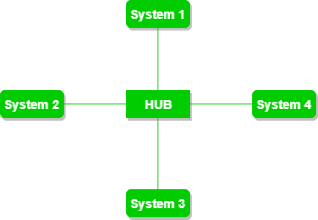
Fig. 1 Reference image for star topology
5. Once the topology is constructed, click on the check button to verify if the constructed topology is built correctly or not.

×
![Modal Image]()